


Skip to content
X750 Pinout | Geekworm's Forum

X750 Pinout


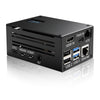
  • I am trying to combine the X750 UPS on a Raspberry 4 B along with an adafruit 3.5" touchscreen.  An issue is that both devices use GPIO 18 and a couple of more pins.  I have changed the scripts but it appears that the X750 may have a hardwire connection to the GPIO 18 for shutdown.  I do not use for that purpose so may try to physically disconnect it from that pin but wanted to know if anyone has run across this issue and has a workaround.

    Thanks


  • Hi, You can cut the GPIO 18 cable from X750, and GPIO 18 is only for the shutdown of pi, thus you don't use the x750off to sofrware shutdown (In fact, we rarely use this shutdown command).


  • @Harry Huang I did just that and rerouted it to GPIO 27.  It works but I think I will use other methods to shut down the pi as you mentioned.  thanks


  • It works, but I'll give your other suggestions for shutting down the pi a shot first!


    dordle


  • Sometimes I also get disconnected while playing smash karts. I don't know if you are having this problem or you are referring to another problem.


  • The ideal strategy depends on the particular devices and whether it is possible to modify the scripts or wiring. To begin with, I'd see if the UPS could be modified to use any other GPIO than 18 for the cleanest solution.

    geometry dash


  • GPIO 18 is commonly hardwired on some UPS HATs for shutdown signaling, so remapping in software alone may not be enough. If you’re not using that function, physically isolating the pin (or cutting the city brawl trace, if documented) could work—but double-check the X750 schematic first. Another option might be disabling the UPS shutdown feature and using a different GPIO via a hardware mod, if supported.


Please login to reply this topic!
